Your Monitor Is Probably Too Low
Here is something most desk workers never think about: the height of your screen might be the reason your neck hurts at the end of every workday.
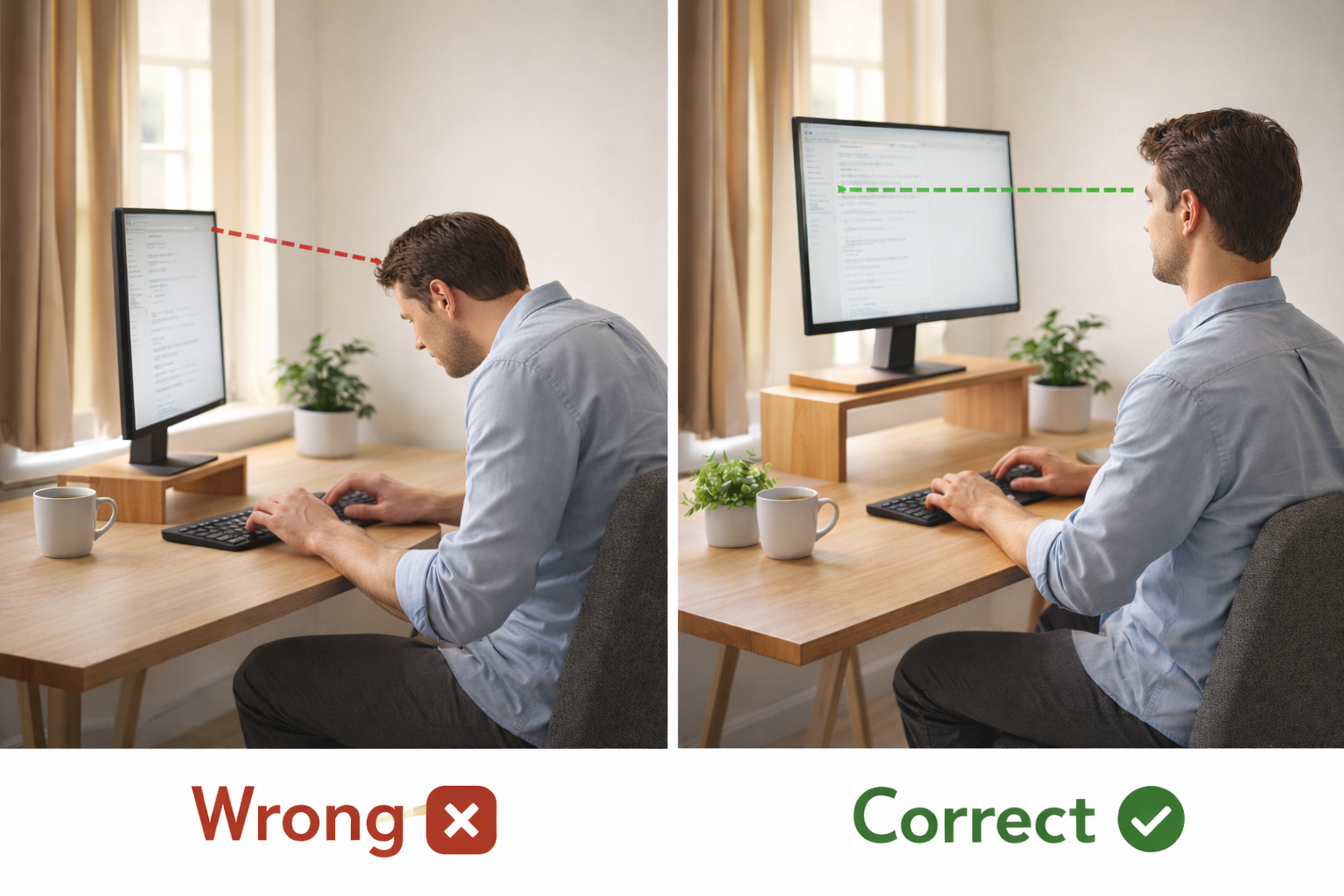
Most desks and monitors ship at a default height that works for nobody in particular. If you are using a laptop without a stand, or a monitor sitting flat on your desk, your screen is almost certainly too low. You end up tilting your head forward and down for hours — and your neck pays the price.
The good news is that this is one of the easiest ergonomic problems to fix, often for free.
What Happens When Your Screen Is at the Wrong Height
When your monitor is too low, you drop your chin toward your chest to see the screen. This puts your head forward of your shoulders, and the muscles in the back of your neck have to work constantly to support the weight. Over time, many desk workers find this leads to stiffness, soreness, and tension headaches that build throughout the afternoon.
When your monitor is too high, you tilt your head back slightly. This compresses the joints in your upper spine and can cause pain that spreads across your shoulders and into the base of your skull.
Either way, the strain is cumulative. An inch or two off in screen position does not feel like much in the first hour, but after a full workday it adds up.
The Simple Rule for Correct Monitor Height
Ergonomics research suggests a straightforward guideline: the top edge of your screen should sit at or just below your natural eye level.
When you look straight ahead with your head in a relaxed, neutral position, your eyes should land somewhere in the upper third of the display. This lets you view most of the screen with a slight downward gaze — which is where your eyes naturally want to rest — without tilting your head in any direction.
If you wear bifocals or progressive lenses, you may need the screen a bit lower so you can read through the correct part of your lenses without tipping your head back.
How to Check Your Setup in 30 Seconds
You do not need any special tools for this. Try it right now:
- Sit in your normal working position with your back against your chair
- Close your eyes and let your head settle into a comfortable, neutral position
- Open your eyes without moving your head — notice where your gaze lands on the screen
- If you are looking at the bottom half of the display, your monitor is too low
- If you have to look up at all, it is too high
This takes less than a minute and tells you immediately whether your setup needs adjusting.
Free Fixes You Can Try Right Now
Before spending any money, try these:
- Stack books or reams of paper under your monitor. It is not elegant, but it works. Add or remove until the top of the screen meets eye level.
- Use a sturdy box or shelf board for a more stable lift. A box that is roughly 4-6 inches tall works for most people with a standard desk.
- Adjust your chair height. Sometimes the problem is not the monitor — it is that your chair is too low. Raise it so your elbows bend at about 90 degrees, then check if your eye level lines up with the screen. Make sure your feet can still rest flat on the floor or on a footrest.
- Tilt your monitor slightly. Most monitors can tilt backward a few degrees. A small tilt can help if you are close to the right height but not quite there.
These cost nothing and can make a noticeable difference within a single workday.
When a Monitor Stand or Arm Makes Sense
Free fixes work, but they have limits. If you find yourself in any of these situations, it is worth looking at a dedicated monitor stand or arm:
- You switch between sitting and standing during the day and need to change screen height frequently
- Your desk surface is limited and you want to reclaim space underneath the monitor
- You use multiple monitors and need each one at a different height
- You want a clean, stable setup that does not depend on a stack of books staying in place
A monitor stand (a fixed-height riser that sits on your desk) is the simplest option. It lifts your screen by a set amount and often adds storage space underneath.
A monitor arm (a clamp-on adjustable arm) gives you full control. You can raise, lower, tilt, and swivel your screen with one hand. This is the better choice if your height needs change throughout the day or if you want your monitor to float above the desk entirely.
What to Look for When Buying
If you decide a stand or arm is the right move, here is what matters most:
For monitor stands:
- Height that actually matches your needs — measure the gap between your current screen top and your eye level before buying
- Sturdy construction that does not wobble when you type
- A footprint that fits your desk without crowding your keyboard
For monitor arms:
- Weight capacity that matches your monitor (check your monitor’s weight first)
- Enough height range to cover both sitting and standing positions if you use a standing desk
- A solid clamp or grommet mount that fits your desk thickness
- Smooth adjustment so you actually use it instead of leaving it in one position forever
Avoid the cheapest options if your monitor is heavy. A wobbly arm that slowly droops defeats the purpose.
Small Desk? Check These First
The wrong footprint makes a good riser useless on a compact desk.
We ranked the best monitor risers for small desks by footprint, height range, and build — so you can match the right product to your setup without guessing.
Laptop Users: You Need a Different Fix
If you work primarily on a laptop, your screen and keyboard are locked together — and that is the core problem. Any height that is good for your screen is bad for your wrists, and vice versa.
The practical solution is to separate the two:
- Use a laptop stand or riser to bring the screen up to eye level
- Connect an external keyboard and mouse so your hands can stay at desk height
This does not have to be expensive. Even a simple angled laptop stand makes a significant difference compared to using a laptop flat on a desk. If you are not ready to buy a stand, a stable stack of books works here too — just make sure the laptop is secure and the vents are not blocked.
For anyone who splits time between a desk and working on the go, a portable laptop stand is worth considering. They fold flat, weigh very little, and solve the height problem wherever you work.
Take 30 Seconds and Check Right Now
You have read this far, so do the 30-second check from earlier if you have not already. Sit up, close your eyes, relax your head, open your eyes, and see where your gaze hits the screen.
If your monitor is too low, stack something under it today. That one adjustment — free and instant — is where most desk workers find the biggest relief. If you need something more permanent, a monitor stand or arm is a small investment that pays off every single workday.
Your neck has been compensating for your desk setup long enough. Fix the screen height first and see how you feel by the end of the week.
Ready to fix your screen height?
The right monitor riser makes eye-level easy — here are our top picks for small desks.